Working with Zoho get Related Records can sometimes become confusing when the correct API name is unknown. Many developers use Zoho get Related Records with a visible related-list name and receive an unexpected error. The function may look correct, yet Zoho CRM still returns no useful data.
In most cases, the problem is not the record ID or Deluge syntax. Instead, the incorrect Related List API Name is being used.
Zoho CRM uses internal API names when functions communicate with modules and related lists. These names can differ from labels shown inside the CRM interface. Therefore, knowing how to find the correct API name can save considerable debugging time.
This guide explains the problem, the correct approach, and a practical use case.
What Does Zoho get Related Records Do?
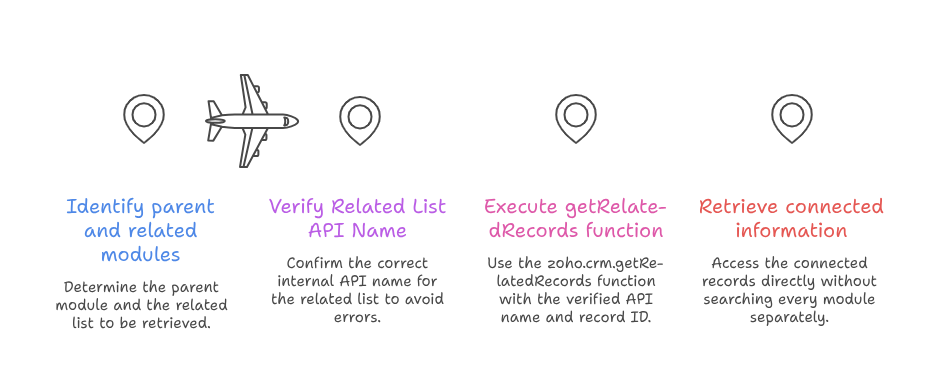
The zoho.crm.getRelatedRecords() function retrieves records connected with another CRM record.
For example, an Account can have Contacts, Deals, Notes, Tasks, and other related information.
Instead of searching every module separately, developers can retrieve this connected information directly.
A basic Deluge example looks like this:
relatedRecords = zoho.crm.getRelatedRecords("Contacts","Accounts",accountId,1,200);
Here, Contacts represents the related list. Meanwhile, Accounts represents the parent module.
The record ID tells Zoho which Account should be checked.
Although the function looks simple, the first parameter often creates confusion.
Why the Related List Name Matters
The first parameter should use the correct Related List API Name.
A developer may see a related list called “Associated Contacts” inside the interface. However, its internal API name might be different.
If the wrong value is passed, a getRelatedRecords Error can occur.
This is why developers should verify API names before building larger functions.
Understanding Zoho CRM Related List API Names
A Zoho CRM Related List API allows developers to access records linked with another CRM record.
These relationships are common throughout Zoho CRM.
For example, an Account may contain:
- Contacts
- Deals
- Notes
- Attachments
- Activities
Each relationship has information that Zoho uses internally.
The visible name is designed for users. However, the API name is designed for integrations and development.
Therefore, both values should not always be treated as identical.
Zoho CRM API Names Versus Display Labels
Zoho CRM API Names are stable identifiers used by APIs, functions, and integrations.
A display label is simply the text users see inside Zoho CRM.
For standard modules, both names may look similar. Custom configurations can make the difference more noticeable.
For example, your team might rename “Deals” to “Opportunities” inside Zoho CRM.
The interface may display Opportunities everywhere. However, existing automation can still depend on the original API name.
The same principle can apply to related lists.
Because of this, developers should avoid guessing Zoho CRM API Names.
Why Does the getRelatedRecords Error Happen?
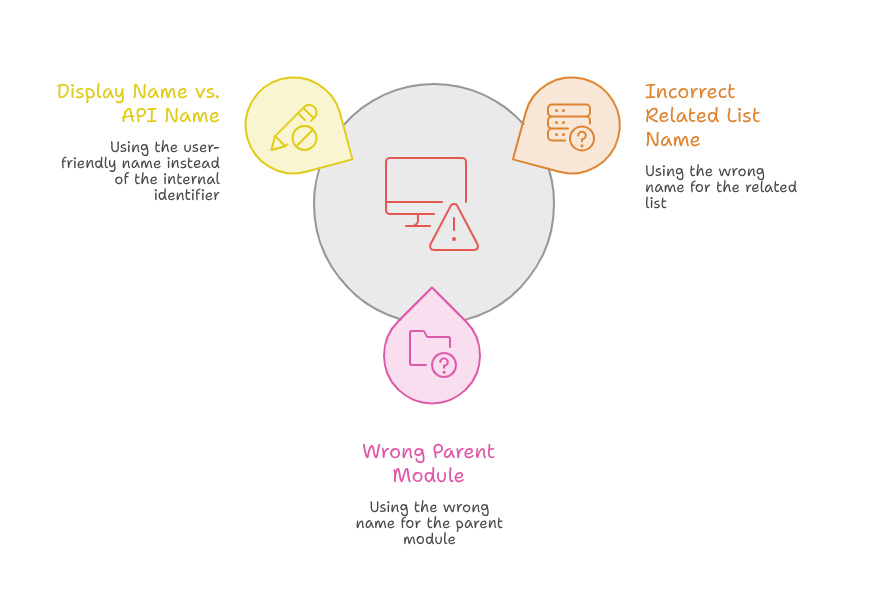
A getRelatedRecords Error can appear for several reasons.
However, an incorrect related-list name is one of the first things worth checking.
The function depends on accurate module information.
If one value is incorrect, Zoho may fail to retrieve the expected records.
Using the Display Name Instead of API Name
This is a common development mistake.
Suppose the CRM interface shows a custom related list with a user-friendly title.
A developer copies that title into the Deluge function.
The code appears logical, but the requested related list may not match the internal identifier.
As a result, the function can return an error or unexpected response.
Before changing other code, confirm the Related List API Name.
Using the Wrong Parent Module
The parent module must also use the proper API name.
For example, fetching Contacts related to an Account requires the correct Accounts module identifier.
Incorrect Zoho CRM API Names can break otherwise valid functions.
Therefore, check both the related list and parent module.
How to Find the Correct Related List API Name
The safest approach is to retrieve related-list metadata instead of guessing names.
Zoho provides metadata that helps developers identify available related lists for a module.
The metadata can expose the internal API information needed for development.
This is especially useful with custom modules and customized CRM environments.
Check Related List Metadata
Start by identifying the parent module.
Next, retrieve its related-list metadata.
Look for the related list you need and review its API information.
Zoho’s current Zoho CRM Related List API documentation also uses related-list API names within related-record endpoints.
The general API pattern is:
/{module_api_name}/{record_id}/{related_list_api_name}
This structure makes the purpose of the Related List API Name clear.
Instead of passing a user-facing label, use the identifier expected by Zoho.
Test Before Building the Full Automation
After finding the API name, test it with one known CRM record.
Do not immediately place the function inside a large workflow.
A small test makes troubleshooting much easier.
First, confirm that the response returns the expected related records.
Then, add filters, loops, conditions, or updates.
This method reduces the chance of hiding a simple getRelatedRecords Error inside complicated code.
Practical Zoho get Related Records Use Case
Consider a sales company using Accounts and Contacts.
Each Account can have several Contacts.
The company wants an automation to find every Contact linked with an Account.
Afterward, the workflow should identify the primary contact for an important notification.
The developer may use:
contacts = zoho.crm.getRelatedRecords("Contacts","Accounts",accountId,1,200);
The function retrieves Contacts associated with that Account.
Next, the script can loop through the returned records.
It can check job titles, email addresses, contact types, or custom fields.
However, imagine the related list has been customized.
The developer uses its visible CRM label rather than the required API identifier.
The script may then produce a getRelatedRecords Error.
Instead of rebuilding the workflow, the developer should inspect the metadata first.
Once the correct Related List API Name is used, the automation can continue normally.
This example shows why small naming details matter during Zoho development.
Best Practices for Zoho CRM Related List API Development
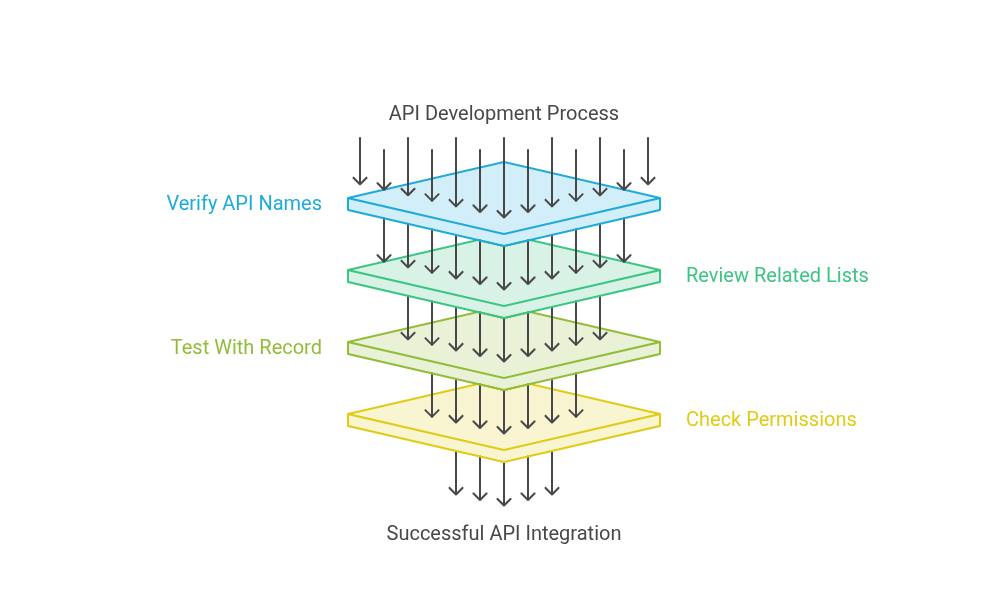
A few simple practices can prevent many API problems.
Never Guess API Names
Always verify Zoho CRM API Names before using them in production code.
This approach becomes even more important for custom modules and custom relationships.
CRM labels can be changed by administrators.
Your automation should rely on the identifiers Zoho expects.
Review Related Lists Before Development
Check the available related lists before creating your function.
The Zoho CRM Related List API metadata can help identify what is actually available.
This step also helps developers understand how records are connected.
Test With a Known Record
Use a CRM record that already contains related data.
This makes testing straightforward.
If the response is empty, you can compare it against information visible inside CRM.
Check Permissions and Layout Configuration
Not every problem comes from API naming.
User permissions can also affect access to records.
Additionally, Zoho states that unavailable or hidden related lists can cause invalid-data responses.
Therefore, check permissions and layouts when the API name is already correct.
Troubleshooting a getRelatedRecords Error
When a function fails, avoid changing several things at once.
Start with the simplest checks.
First, confirm the parent record ID.
Then, verify the parent module API name.
After that, confirm the related-list API name.
You should also check whether the authenticated user can access the required information.
Next, test the function with a small response size.
This structured process makes a getRelatedRecords Error easier to identify.
It also prevents unnecessary changes to working automation.
For complex implementations, document important Zoho CRM API Names used throughout the project.
This gives future developers a reliable reference.
Why Correct API Names Matter in Zoho Automation
Small API naming mistakes can affect much larger business processes.
A failed related-record request might stop follow-up emails.
It could also prevent invoices, tasks, notifications, or CRM updates from running correctly.
For that reason, the Zoho CRM Related List API should be implemented carefully.
Verified API names make automation more dependable.
They also make future maintenance easier.
This becomes especially important when several Zoho applications share CRM information.
Conclusion
The Zoho get Related Records function is extremely useful for retrieving connected CRM information. However, it depends on correct identifiers.
A visible related-list label should never be assumed to be its API name.
Instead, developers should verify the Related List API Name through Zoho metadata.
They should also confirm parent module names, permissions, layouts, and record IDs.
Correct Zoho CRM API Names make Deluge functions easier to maintain. They also reduce unexpected failures during automation.
Zoho can become a powerful foundation for sales, operations, support, marketing, and business automation. However, proper implementation makes a major difference.
Working with an experienced Zoho partner can help prevent configuration and development problems. It also helps businesses build automation around their actual processes.
With iTecZone as a certified Zoho partner and experienced Zoho developers, businesses can access professional services across Zoho applications. From CRM customization to API integrations and Deluge automation, iTecZone can support both simple and complex requirements. This makes iTecZone a reliable choice when you need an experienced Zoho Consultant Partner.
FAQ’s
What is Zoho get Related Records?
Zoho get Related Records is commonly used to retrieve records connected with another Zoho CRM record. Developers can use it for Contacts, Notes, Deals, and other supported relationships.
Why am I getting a getRelatedRecords Error?
A getRelatedRecords Error can occur because of an incorrect API name, record ID, permission, or configuration. Start by checking the related-list and parent-module API names.
How do I find a Related List API Name in Zoho CRM?
Use related-list metadata for the relevant CRM module. It helps identify the internal information Zoho expects when requesting related records.
Are Zoho CRM API Names the same as field labels?
Not always. Zoho CRM API Names are internal identifiers. Labels are user-facing names that administrators can customize.
What is the Zoho CRM Related List API used for?
The Zoho CRM Related List API retrieves information associated with a specific CRM record. This may include Notes, Contacts, Attachments, Deals, and other related records.
Can custom CRM changes cause related-record errors?
Yes. Customized modules, relationships, permissions, and layouts can affect API requests. Always verify API names after major CRM configuration changes.
Should I use the related-list display name in getRelatedRecords?
You should use the API name expected by Zoho. A display label may differ from its internal Related List API Name.
Can a Zoho partner help fix related-list API problems?
Yes. An experienced Zoho partner can review Deluge code, API configurations, permissions, and related-list structures. They can also improve the wider automation instead of fixing only one error.