This inventory tracking system guide helps businesses understand stock control in a simple way. Also, a clear inventory tracking system guide helps reduce errors, delays, and wasted money.
Every business needs better control over its stock. Whether you sell online, manage a warehouse, or run a retail store, inventory matters. However, poor stock control can create serious problems. You may lose sales, overstock items, or disappoint customers. As a result, profit and customer trust can both suffer.
That is why a good inventory tracking system is no longer optional. Today, many businesses use inventory management software to manage products, orders, and warehouse movement. In addition, it helps teams know what is available, what is low, and what needs attention. With real time inventory tracking, business owners can make faster and smarter decisions.
Moreover, a reliable stock tracking system business setup can improve daily operations. It can also save time for sales, finance, and warehouse teams. When your warehouse inventory control is strong, your business becomes more organized.
What Is an Inventory Tracking System?
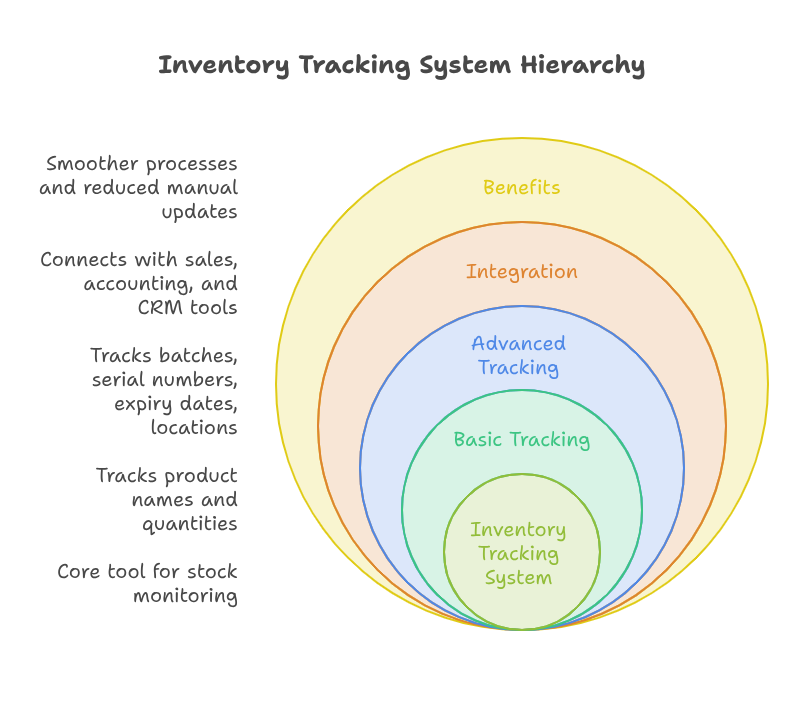
An inventory tracking system is a tool used to monitor stock levels. It tracks products from purchase to storage and sale. In simple terms, it helps businesses know where every item is located.
A basic inventory tracking system may track product names and quantities. On the other hand, an advanced system can track batches, serial numbers, expiry dates, and warehouse locations. Many companies now connect their inventory management software with sales, accounting, and CRM tools.
As a result, the process becomes smoother. It also removes the need for manual updates across different systems.
Why Manual Stock Tracking Creates Problems
Manual stock tracking can work for a very small business. However, it becomes risky as the business grows. Human errors can happen during data entry. Stock counts may not match actual warehouse numbers.
For example, a team may sell products that are no longer available. Meanwhile, another team may order products that are already in stock. These mistakes cost time and money.
This is where real time inventory tracking becomes useful. It gives your team updated stock information instantly. Therefore, everyone can work with the same accurate data.
Why Businesses Need Better Inventory Control
Good inventory control helps you avoid both shortage and overstock. Shortage means you cannot fulfill customer orders. Overstock means your money is stuck in slow-moving products.
In both cases, business growth becomes harder. A proper inventory tracking system helps prevent these issues. More importantly, it gives your team better control over daily operations.
Better Visibility Across Stock
Inventory visibility is very important. You should know what products are available at any time. You should also know where they are stored.
With inventory management software, this becomes easier. You can view product details, warehouse levels, and order history in one place. Because of this, owners and managers can make better choices.
Faster Order Fulfillment
Customers expect fast delivery. If your team cannot find stock quickly, orders get delayed. For this reason, a smart stock tracking system business process helps reduce these delays.
Warehouse teams can pick, pack, and ship products with less confusion. At the same time, sales teams can confirm availability before promising delivery. This improves the customer experience.
Reduced Stock Errors
Stock errors can happen when systems are not connected. For example, a sale may happen online, but the warehouse may not update quickly. This can create wrong stock numbers.
Real time inventory tracking helps solve this problem. When stock moves, the system updates immediately. As a result, all departments stay aligned.
Key Features of a Good Inventory Tracking System
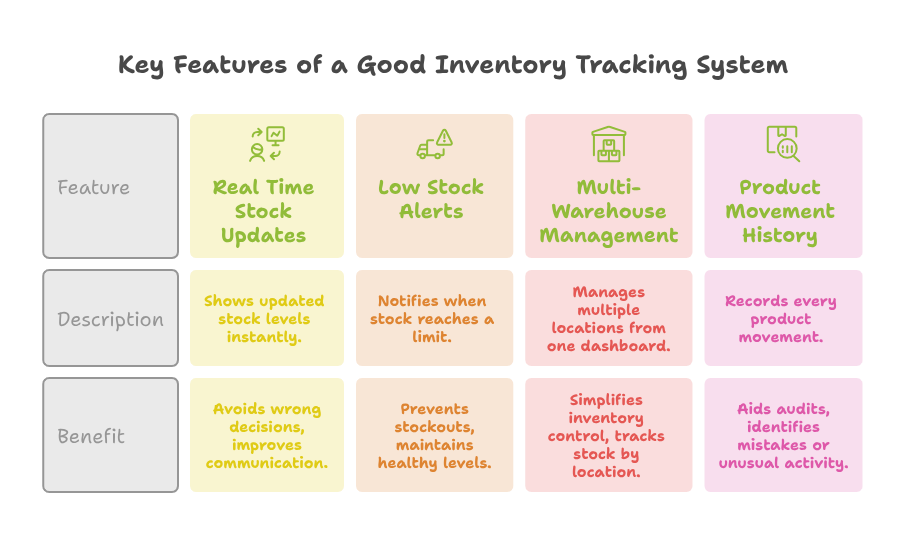
A good inventory tracking system should be easy to use. It should also support your business growth. Therefore, the right tool depends on your business size, product type, and workflow.
Real Time Stock Updates
Real time inventory tracking is one of the most important features. It shows updated stock levels when products are sold, received, or transferred.
Because of this, businesses can avoid wrong decisions. It also improves communication between sales and warehouse teams.
Low Stock Alerts
Low stock alerts help you reorder products before they run out. This is very useful for fast-selling items. Instead of checking stock manually every day, your team can depend on alerts.
Inventory management software can send alerts when stock reaches a set limit. As a result, you can maintain healthy stock levels.
Multi-Warehouse Management
Many growing businesses store products in more than one location. Because of that, warehouse inventory control can become more difficult.
A good system lets you manage multiple warehouses from one dashboard. In addition, you can track stock by location and transfer products when needed.
Product Movement History
A strong inventory tracking system records every product movement. You can see when stock was received, sold, returned, or adjusted.
This helps during audits. Also, it helps identify mistakes or unusual stock activity.
How Inventory Management Software Improves Daily Work
Inventory management software does more than count products. It helps automate daily tasks and reduce manual work.
For instance, your team can create purchase orders, manage vendors, track sales, and update stock. As a result, your operations become more organized.
Better Coordination Between Teams
Sales, warehouse, and finance teams often depend on the same data. When each team uses separate files, confusion increases.
A connected inventory management software system solves this issue. Everyone can access updated information from one place. Therefore, teamwork improves and repeated questions decrease.
Smarter Buying Decisions
Buying too much stock can block your cash flow. However, buying too little can stop your sales. A stock tracking system business setup helps you understand product demand.
By checking sales history and stock trends, you can make smarter purchase decisions. This helps you order the right products at the right time.
Easier Reporting
Reports help you understand business performance. You can see your best-selling products, slow-moving items, and current stock value.
With warehouse inventory control reports, managers can plan better. In addition, they can reduce waste and improve warehouse space usage.
Use Case Example: Retail Business With Online Orders
Let’s say a retail business sells electronics online and in-store. The company manages phones, accessories, and repair parts.
Before using an inventory tracking system, the team used spreadsheets. The online store showed some products as available. However, the warehouse had already sold those items in-store.
This caused canceled orders and unhappy customers. Also, the team ordered extra accessories without checking actual stock. As a result, money was stuck in slow-moving items.
After using inventory management software, the business improved quickly. Real time inventory tracking updated stock after every sale. Because of this, online and in-store stock became connected.
The warehouse team could see exact product locations. This improved warehouse inventory control and reduced picking mistakes. In addition, the business created low stock alerts for fast-selling items.
Now, the company orders products based on real demand. Its stock tracking system business process is faster and cleaner. Therefore, customers receive accurate updates and quicker deliveries.
Steps to Build a Smarter Stock Control Process
A better stock process starts with clear planning. Before choosing a system, you should understand your current problems.
Review Your Current Stock Problems
First, check where mistakes happen. Are products missing from the warehouse? Do orders get delayed due to stock confusion? Are teams using too many spreadsheets?
Once you answer these questions, choosing the right inventory tracking system becomes easier.
Choose the Right Software
Not every tool fits every business. Therefore, your inventory management software should match your workflow. It should support your sales channels, warehouses, and reporting needs.
Also, choose a system that can grow with your company. This will save time and cost later.
Train Your Team Properly
Even the best tool will fail without proper training. Your team should know how to update stock, create orders, and read reports.
Besides that, training helps reduce resistance. When employees understand the benefits, they use the system better.
Keep Data Clean
Clean data is very important. Product names, SKUs, prices, and stock limits should be accurate. Otherwise, poor data can create poor results.
A good stock tracking system business setup depends on clear and updated information.
Common Mistakes to Avoid
Many businesses make mistakes when setting up inventory systems. Unfortunately, these mistakes can reduce the value of the software.
Ignoring Warehouse Workflow
Your software should match your actual warehouse process. If it does not, your team may avoid using it. Therefore, good warehouse inventory control starts with practical workflows.
Not Using Real Time Data
Some businesses install software but still update stock manually later. This removes the main benefit of automation. For better results, real time inventory tracking should be used properly from the start.
Skipping Customization
Every business has different needs. Because of this, a basic setup may not handle your full process. Customization can make your inventory tracking system more useful.
It can connect your sales, accounting, CRM, and warehouse tools. As a result, your business gets a smoother workflow.
Conclusion
A strong inventory tracking system helps businesses manage stock with more confidence. It improves accuracy, saves time, and reduces costly mistakes. With the right inventory management software, your team can work faster and smarter.
Real time inventory tracking also improves decision-making. It gives managers clear data when they need it most. In addition, better warehouse inventory control means fewer delays and better customer service.
A reliable stock tracking system business process can support long-term growth. It helps you avoid overstock, stockouts, and manual errors. For growing companies, this is a major advantage.
Zoho can play an important role in improving your business operations. It offers powerful tools for inventory, sales, finance, CRM, and automation. However, successful setup often needs expert support. With iTecZone as a certified Zoho partner and a team of experienced developers, you can access top-tier services for all Zoho applications. This is why iTecZone is the perfect choice as your Zoho Consultant Partner.
FAQ’s
Q: What is an inventory tracking system?
A: An inventory tracking system helps businesses monitor stock levels, product movement, and warehouse availability. It gives clear information about what is in stock.
Q: Why is inventory management software important?
A: Inventory management software reduces manual work and stock errors. Also, it helps teams manage sales, purchases, warehouses, and reports from one place.
Q: What is real time inventory tracking?
A: Real time inventory tracking updates stock data instantly when products move. As a result, businesses can avoid overselling, delays, and wrong stock information.
Q: How does warehouse inventory control help a business?
A: Warehouse inventory control helps organize products, locations, and stock movement. It improves order fulfillment and reduces warehouse mistakes.
Q: Is a stock tracking system business setup useful for small companies?
A: Yes, a stock tracking system business setup is useful for small companies. It helps them stay organized and prepare for growth.
Q: Can Zoho help with inventory tracking?
A: Yes, Zoho can help manage inventory, sales, purchases, and reports. With expert implementation, Zoho can be customized for your business needs.
Q: Why should I choose a Zoho partner for implementation?
A: A Zoho partner understands setup, customization, and integration. Therefore, they can build workflows that match your business process and reduce setup mistakes.