Zoho CRM Account Columns help sales teams identify the correct company during deal entry. However, Zoho CRM Account Columns may disappear from the account selection window. This problem slows users and increases the risk of selecting the wrong account. Fortunately, the issue usually involves lookup settings, permissions, layouts, or display limits.
Why Account Columns Matter During Deal Creation

During Zoho CRM Deal creation, users often select a company through the Account Name lookup field. Clicking this field opens the Choose Account window.
This window should show useful information beside each account name. For example, users may need the account owner, phone number, industry, city, or customer status.
These details become important when several accounts have similar names. Without helpful Zoho CRM Account Columns, users may open multiple records before finding the correct company.
Zoho CRM uses lookup fields to connect records between different modules. Therefore, a Deal record can link directly with a company inside the Zoho CRM Accounts module. Zoho also confirms that lookup fields create relationships between CRM modules.
What Is the Choose Account Window?
The Choose Account window is a record selection popup. It appears when someone searches for an account from another CRM module.
During Zoho CRM Deal creation, this popup should provide enough details for a confident selection. However, users sometimes see only the account name and one basic field.
This situation does not always mean the missing fields were deleted. In many cases, they still exist inside the Zoho CRM Accounts module. They are simply unavailable within the lookup display.
Why Zoho CRM Account Columns Are Missing
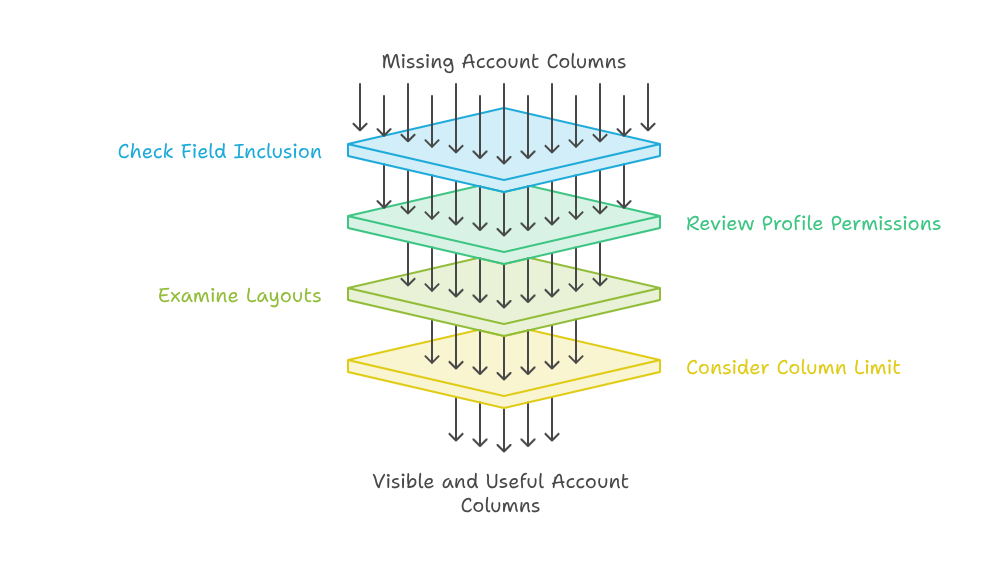
Several settings can control which columns appear. The correct solution depends on your layouts, profiles, fields, and CRM configuration.
Fields Are Not Included in the Lookup Display
The most common cause involves Zoho CRM field selection. A field may exist in the Accounts layout but remain excluded from the lookup popup.
Administrators should review which fields are available for the account lookup. They can then select the most useful details for the sales team.
A practical Zoho CRM field selection may include these fields:
- Account Name
- Account Owner
- Phone
- Industry
- Billing City
- Account Type
Avoid adding every available field. Too many columns can make the Choose Account window difficult to read.
Profile Permissions Are Hiding Fields
Field permissions can also affect Zoho CRM Account Columns. Administrators may see a field that sales users cannot access.
Review the profile permissions for every missing field. Confirm that each field remains visible and readable for the affected team members.
Different profiles may also use different layouts. Therefore, always test the issue using the affected user’s account.
A hidden field inside the Zoho CRM Accounts module may remain hidden within the lookup window. Permission testing is an essential troubleshooting step.
Different Layouts Use Different Fields
Many companies use separate layouts for customers, partners, vendors, or regional accounts. Each layout may include different fields.
During Zoho CRM Deal creation, the lookup can return records from several layouts. However, some selected fields may not exist within every layout.
This difference can create inconsistent results inside the Choose Account window. One account may show complete information, while another account shows empty columns.
Open Setup and review the Modules and Fields section. Zoho identifies this area as the main location for module and field customization.
Confirm that the required fields exist within the correct Accounts layouts. Also, check the permissions assigned to those fields.
The Zoho CRM Column Limit Has Been Reached
The Zoho CRM column limit may prevent every requested field from appearing. Popup space and interface rules can restrict the displayed information.
Instead of adding every field, prioritize details that help users make a decision. Remove information that repeats existing data or provides limited value.
For example, Billing City may be more useful than a complete billing address. Account Type may provide more value than a long internal description.
A sensible Zoho CRM column limit strategy improves readability. It also keeps the account selection process simple for new users.
How to Fix Missing Account Columns
Start with the affected Deal layout. Find the Account Name lookup field and review its available configuration.
Next, inspect the Zoho CRM Accounts module. Confirm that the required fields exist and contain accurate information.
After making changes, test the Choose Account window again. Search for an account containing values in every selected field.
Step-by-Step Troubleshooting Process
First, log in using an administrator account. Open Setup and select Modules and Fields.
Next, open the Deals module. Select the layout used by the affected sales team.
Locate the Account Name field used during Zoho CRM Deal creation. Review its lookup display settings.
Update the Zoho CRM field selection with relevant account details. Keep the selected columns simple and useful.
After that, open the Zoho CRM Accounts module settings. Review each field’s layout placement and profile permissions.
Save the changes and refresh the CRM page. Then test the Choose Account window using the affected user profile.
Clear the browser cache when saved changes still do not appear. You should also test another supported browser.
Practical Use Case
Consider a distribution company with several accounts using similar names. Different branches belong to the same national customer.
The sales team creates Deals for several cities. However, the Choose Account window only displays the Account Name.
A sales representative selects “Bright Retail” without seeing its city. The new Deal becomes linked with the wrong branch.
The administrator then updates the Zoho CRM field selection. The popup now displays Account Name, Billing City, Account Owner, and Phone.
After this update, Zoho CRM Deal creation becomes faster and more accurate. Sales representatives can identify the correct branch immediately.
This example also explains why the Zoho CRM column limit requires careful planning. Useful columns prevent mistakes, while unnecessary columns create clutter.
How to Prevent This Problem
Document the approved lookup columns for every important CRM module. Review them whenever your team changes fields or layouts.
Always test new settings through several user profiles. Administrator testing alone may not reveal permission problems.
Keep field names clear and consistent. Avoid creating multiple fields that store almost identical information.
Review the Zoho CRM Accounts module regularly. Remove unused fields and confirm that important account records contain complete data.
You should also train users to report issues clearly. Ask them to mention the module, layout, profile, field, and browser.
Conclusion
Missing Zoho CRM Account Columns can make simple sales activities slower and less reliable. The issue usually involves lookup settings, permissions, layouts, or the Zoho CRM column limit.
A focused Choose Account window helps users select the correct company without opening several records. Better Zoho CRM field selection also improves accuracy during Zoho CRM Deal creation.
Zoho can connect sales, marketing, service, finance, and other business processes within one flexible ecosystem. However, successful results require proper planning, configuration, automation, and ongoing support.
With iTecZone as a certified Zoho partner, you gain access to experienced consultants and developers. Our team can implement, customize, integrate, and optimize Zoho applications around your business requirements. This makes iTecZone the perfect choice as your trusted Zoho Consultant Partner.
FAQ’s
Why are Zoho CRM Account Columns not appearing?
The selected fields may not be included in the lookup display. Profile permissions or layout differences may also hide them.
Can I add more fields to the Choose Account window?
You can adjust the Zoho CRM field selection for the account lookup. Available options may depend on your CRM configuration.
Does the Zoho CRM column limit affect lookup windows?
Yes, display limits can restrict visible fields. Select only the columns that help users identify the correct account.
Why can administrators see columns that sales users cannot?
Administrators usually have broader field access. Check the affected user’s profile permissions and assigned layout.
Can lookup filters improve account selection?
Yes. Lookup filters can display suitable records, such as active accounts during Deal entry. Zoho provides this use case in its documentation.
Should I customize the Zoho CRM Accounts module first?
Yes. Confirm that the required fields exist and contain reliable data before changing the lookup display.
Can browser cache cause missing columns?
Sometimes, older interface data remains stored in the browser. Refresh the page or clear the cache after saving configuration changes.
Can iTecZone fix this Zoho CRM issue?
Yes. iTecZone can review layouts, permissions, lookup settings, field configurations, automation, and other Zoho CRM customizations.