Zoho CRM field service connects customer management with daily field operations. Zoho CRM field service also helps teams manage work without scattered tools. It brings sales records, service requests, technicians, and customer details into one connected workflow. This setup gives managers better control and helps customers receive faster service.
What Is Zoho CRM Field Service Management?

Zoho CRM field service management combines CRM data with tools for planning and completing on-site jobs. It helps service businesses manage requests, estimates, work orders, appointments, assets, and customer records.
The Zoho FSM extension supports two-way customer data syncing between Zoho CRM and Zoho FSM. Teams can also view service information within relevant CRM records.
This connection reduces repeated data entry and keeps sales and service teams aligned. It also creates a clearer customer history for every department.
One System for Sales and Service Teams
Sales teams often collect important details before a service visit begins. However, those details may never reach the technician.
Zoho FSM integration with CRM helps move relevant information between both teams. Salespeople can create requests, estimates, work orders, and assets from Zoho CRM.
Service teams can then plan work using updated customer and product details. This process reduces confusion after a deal closes.
Better Visibility Across Customer Records
A connected system gives staff a complete view of each customer. They can review service requests, estimates, appointments, work orders, and registered assets.
This visibility makes conversations more useful and personal. Staff can understand previous issues before contacting or visiting the customer.
Zoho CRM field service management also helps managers review service activity without searching across separate systems. That saves time during follow-ups and escalations.
Why Businesses Need Field Service Automation
Manual field operations become difficult as service volume grows. Spreadsheets, phone calls, and chat messages cannot provide reliable operational control.
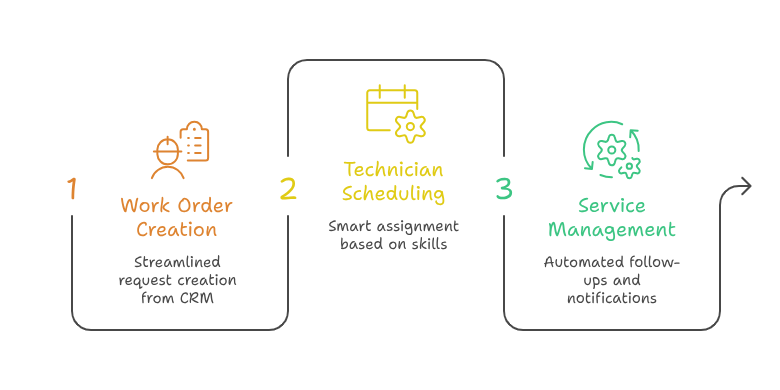
Field service management software Zoho creates a structured process for every job. It helps teams record requests, assign work, and monitor progress.
Faster Work Order Creation
Staff can create service records directly from CRM data. This means customer details do not require repeated manual copying.
For example, a salesperson can create an installation request after closing a machinery sale. Zoho supports creating service requests from CRM sales records.
This workflow allows the service team to begin planning immediately. It also lowers the risk of missing customer requirements.
Smarter Technician Scheduling and Dispatch
Technician dispatch software CRM helps managers assign the right person to each job. The assignment can consider location, availability, skills, and priority.
A clear schedule helps technicians avoid unnecessary travel and missed appointments. It also gives office teams better control over urgent requests.
Technician dispatch software CRM can improve communication between coordinators and field staff. Everyone can work from the same appointment information.
Stronger Service Management Automation
Zoho CRM service management automation reduces repetitive steps across the service process. Teams can automate follow-ups, status changes, notifications, and internal approvals.
Automation keeps work moving when service volume increases. It also helps managers maintain consistent processes across different service regions.
Zoho CRM service management automation can support better response times. Customers receive updates without depending on repeated manual calls.
Key Benefits of Zoho FSM Integration With CRM
Zoho FSM integration with CRM creates practical value across sales, operations, finance, and customer service. The biggest benefit is shared information between connected teams.
Improved Data Accuracy
Two-way syncing helps keep customer information updated across Zoho CRM and Zoho FSM.
Accurate records reduce duplicate entries and prevent technicians from using outdated contact details. This improves both productivity and customer confidence.
Better Customer Experience
Customers expect quick answers and reliable appointment updates. Connected service data helps staff respond with greater confidence.
Field service management software Zoho gives teams better access to job details and customer history. This makes every interaction more informed.
Clearer Performance Tracking
Managers need visibility into workloads, job progress, and service quality. A connected setup makes operational reporting easier.
Zoho CRM field service management can help businesses compare sales activity with service demand. Leaders can identify delays, recurring issues, and growth opportunities.
Easier Business Growth
Growth creates more customers, technicians, locations, and service records. Manual processes usually become slower during business expansion.
Zoho CRM field service provides a flexible foundation for growing service operations. Businesses can standardize workflows while maintaining access to customer context.
Practical Use Case: Equipment Installation and Maintenance
Consider a company selling commercial water filtration systems. Its sales team manages leads and deals inside Zoho CRM.
After a sale, the customer needs installation and scheduled maintenance. Without integration, employees may copy information into spreadsheets or separate service tools.
With Zoho FSM integration with CRM, the salesperson can create a service request from the completed sale. The service team receives the customer and product details.
A manager then uses technician dispatch software CRM processes to assign a qualified installer. The technician receives the appointment details and completes the installation.
The installed product can be managed as an asset for future service planning. Zoho allows CRM products to become assets within Zoho FSM.
Later, Zoho CRM service management automation can support maintenance reminders and follow-up tasks. The company gains a complete record of ongoing service.
This example shows how field service management software Zoho connects revenue with long-term customer care. It also supports repeat business opportunities.
How to Plan a Successful Zoho Field Service Setup
A successful implementation requires more than installing an extension. The system must match the company’s real service process.
Review the Existing Workflow
Start by mapping how service requests enter the business. Review scheduling, dispatch, job completion, invoicing, and customer follow-up.
This step identifies delays and repeated manual work. It also helps define the required fields, statuses, and automation rules.
Define Data and User Responsibilities
Decide which information should move between systems. Customer, contact, product, asset, and service details must follow clear standards.
Each user should also understand their responsibilities. Salespeople, dispatchers, technicians, and managers need suitable permissions and views.
Customize the System Around Your Needs
Every service company works differently. Standard settings may not support unique approvals, territories, contracts, or service agreements.
A Zoho specialist can customize modules, functions, workflows, and integrations. Zoho FSM also provides APIs for connecting external applications.
This creates a stronger system than a basic installation. It also prepares the business for future operational changes.
Conclusion
Zoho CRM field service helps businesses connect customer relationships with field operations. It improves visibility, reduces manual work, and supports faster service delivery.
Zoho CRM field service management also strengthens collaboration between sales and service teams. Companies can manage technicians, assets, appointments, and work orders more effectively.
Zoho CRM service management automation brings consistency to growing service operations. Meanwhile, technician dispatch software CRM improves scheduling and daily coordination.
Zoho can become a central platform for sales, service, finance, and customer communication. However, the right implementation is essential for long-term value.
With iTecZone as a certified Zoho partner, your business can access experienced Zoho developers and consultants. Our team can implement, integrate, and customize Zoho applications around your goals. This makes iTecZone the perfect Zoho Consultant Partner for complete business automation.
FAQs
What is Zoho CRM field service?
It connects CRM customer data with tools for managing on-site service work. It supports better coordination between sales and service teams.
How does Zoho FSM integration with CRM work?
Zoho FSM integration with CRM can sync customer data between both applications. It also displays service records within relevant CRM accounts.
Can Zoho CRM create field service work orders?
Yes. Users can create service requests, estimates, and work orders from supported Zoho CRM records.
Is field service management software Zoho suitable for growing businesses?
Yes. Field service management software Zoho supports structured workflows, customer records, scheduling, assets, and service history.
Can Zoho help with technician scheduling?
Yes. Technician dispatch software CRM workflows can support job assignment and appointment planning. Businesses can organize technicians using skills and availability.
Why should a business hire a Zoho partner?
A Zoho partner can plan data mapping, workflows, integrations, permissions, and custom functions. This reduces setup mistakes and improves user adoption.