Zoho Inventory Management Software: A Smarter Way to Manage Stock and Orders
Managing inventory becomes difficult when your business starts growing. More products, more customers, and multiple sales channels can quickly make stock management complicated.
A small mistake in inventory records can create bigger problems. You might sell products that are unavailable, order unnecessary stock, or delay customer deliveries.
This is where Zoho Inventory Management Software can make a difference.
Zoho Inventory helps businesses manage stock, sales orders, purchases, warehouses, and shipping from one platform. Instead of updating spreadsheets throughout the day, your team can work with connected inventory records.
Whether you run a retail store, wholesale business, or online shop, Zoho Inventory helps organize daily operations.
Let’s explore how it works, its important features, and why businesses choose it for inventory management.
What Is Zoho Inventory Management Software?
Zoho Inventory is a cloud-based inventory and order management application designed for businesses that sell physical products.
It helps you track available stock, manage customer orders, monitor purchases, and organize warehouse operations.
For example, imagine running an online electronics store with hundreds of products.
Customers place orders through your website, while your team also handles direct sales. Without proper inventory software, keeping track of every product becomes challenging.
Zoho Inventory brings these activities together. When properly connected to your sales channels, it updates inventory records as transactions are processed.
This gives your team a clearer picture of available stock and pending orders.
The software also connects with other Zoho applications, making it useful for businesses already using the Zoho ecosystem.
Why Do Businesses Need Inventory Management Software?
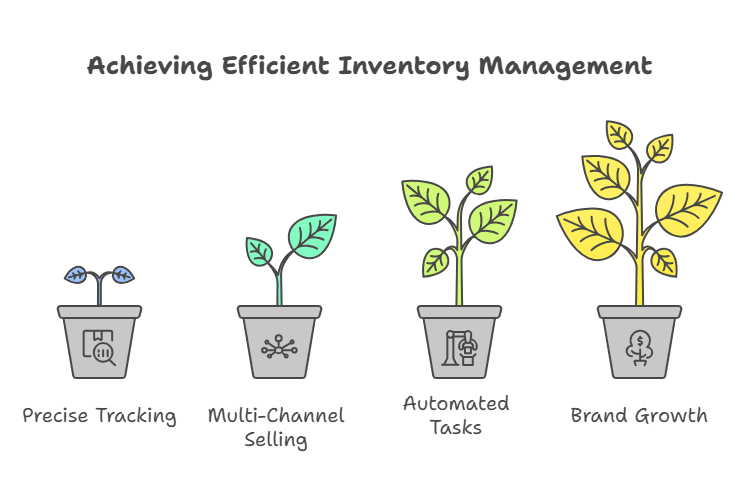
Inventory management involves more than counting products on shelves. It affects purchasing decisions, customer satisfaction, cash flow, and daily business operations.
Many small businesses begin with spreadsheets. This approach can work when products and orders are limited.
However, manual inventory tracking becomes difficult as the business expands.
Employees may forget to update quantities, enter incorrect figures, or struggle to identify slow-moving products.
These mistakes can lead to unnecessary expenses and missed sales opportunities.
Using inventory management software helps businesses maintain organized records and reduce repetitive administrative work.
It also makes inventory information easier to access across different departments.
For growing companies, this visibility is especially valuable when managing multiple warehouses or online stores.
Key Features of Zoho Inventory Management Software
Zoho Inventory offers several features that simplify stock control and order processing. Each feature supports a different part of daily inventory operations.
1. Real-Time Inventory Tracking
Knowing how much stock you have is essential for running a product-based business.
Zoho Inventory allows businesses to monitor product quantities, stock movements, and inventory availability from one dashboard.
When sales and purchasing activities are recorded, inventory information is updated accordingly.
This helps employees check product availability before confirming customer orders.
For example, a furniture retailer can monitor available tables, chairs, and cabinets without checking every storage location manually.
Accurate inventory records also help purchasing teams make better restocking decisions.
2. Sales Order and Purchase Order Management
Handling sales and purchase orders manually can consume valuable time.
Zoho Inventory helps businesses create, manage, and track these transactions within one system.
When customers place orders, employees can record product details, quantities, and order status.
Similarly, purchasing teams can create purchase orders and track incoming goods from suppliers.
This organized process reduces confusion between sales, purchasing, and warehouse departments.
It also makes it easier to review previous transactions whenever needed.
3. Multi-Warehouse Inventory Management
Businesses operating from multiple locations often struggle to maintain accurate stock records.
One warehouse may have excess inventory while another runs short of popular products.
Zoho warehouse management features help businesses monitor inventory across different locations.
Users can view location-specific stock levels and record transfers between warehouses.
For example, a clothing distributor might store products in three different cities.
With Zoho Inventory, the team can check which warehouse has the required items before processing an order.
This helps businesses plan stock movements and use available inventory more effectively.
Advanced warehouse features depend on the selected subscription plan.
4. Multi-Channel Inventory Management
Selling through multiple platforms creates additional inventory challenges.
A business might receive orders from Shopify, Amazon, and its own sales team.
Without connected inventory records, the same product could accidentally be sold more than once.
Zoho Inventory supports integrations with popular ecommerce platforms and marketplaces.
These integrations help synchronize orders and stock information between supported sales channels.
For example, when an order is processed through a connected Shopify store, the corresponding inventory records can be updated.
This reduces manual updates and helps businesses maintain consistent stock information.
Integration availability and synchronization behavior may vary by platform and region.
5. Barcode Scanning and Product Tracking
Businesses handling large product catalogs need an efficient way to identify individual items.
Zoho Inventory supports barcode generation and scanning to simplify common inventory tasks.
Employees can use barcodes to identify products and enter relevant information during transactions.
The software also supports serial number and batch tracking on eligible plans.
Serial tracking is useful for businesses selling electronics, equipment, and warranty-based products.
Batch tracking can help businesses monitor products manufactured or purchased in groups.
These features improve product traceability and make inventory records easier to maintain.
6. Automated Reorder Alerts
Running out of popular products can affect sales and customer relationships.
At the same time, purchasing too much inventory can create unnecessary storage expenses.
Zoho Inventory helps businesses address both problems through reorder points.
You can define minimum stock thresholds for individual products.
When inventory reaches the configured level, the system can notify your team.
For example, a retailer might set a reorder point of 20 units for a frequently purchased product.
Once stock reaches that threshold, the purchasing team receives an alert and can arrange replenishment.
This approach helps businesses plan purchases instead of reacting after products become unavailable.
7. Inventory Reports and Business Insights
Good inventory decisions depend on reliable information.
Zoho Inventory provides reports that help businesses understand stock movement, sales activity, and purchasing patterns.
Managers can review inventory valuation, product performance, and other operational details.
These reports can help identify products that sell quickly and items that remain unsold.
For example, a retailer might discover that certain accessories sell consistently while other products move slowly.
This information can guide future purchasing decisions and reduce unnecessary inventory buildup.
How Zoho Inventory Integrates with Zoho CRM
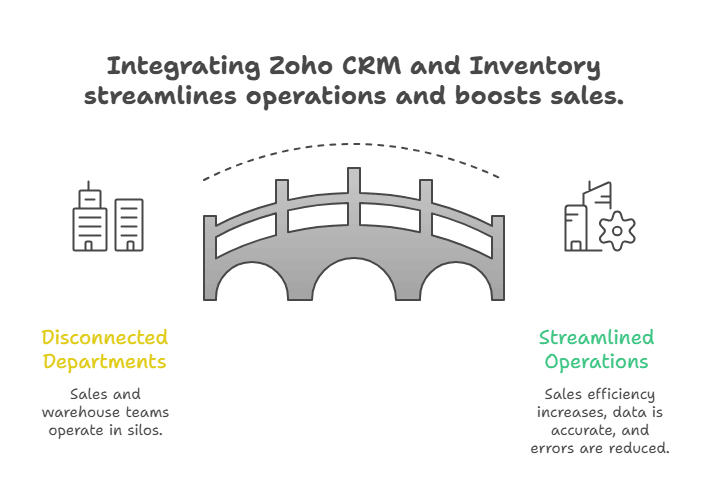
Sales and inventory teams often work with different information.
Sales representatives focus on customers, quotations, and opportunities. Warehouse employees focus on product availability and order fulfillment.
When these departments use disconnected systems, mistakes become more likely.
Zoho CRM and Zoho Inventory integration helps connect customer information with inventory and order processes.
Businesses can synchronize supported customer and transaction records between the applications.
This reduces duplicate data entry and helps teams work with more consistent information.
For example, a sales representative preparing a customer order can benefit from connected inventory information.
However, the exact data available depends on the integration configuration.
Businesses should carefully plan their CRM and Inventory setup to avoid duplicate records and synchronization problems.
Zoho Inventory and Zoho Books Integration
Inventory management and accounting are closely connected.
Every purchase, sale, and stock adjustment can affect financial records.
Zoho Inventory integrates with Zoho Books to support connected inventory and accounting operations.
This helps businesses maintain consistent transaction information across both applications.
For example, when your team processes sales and purchasing activities, supported financial information can flow into the connected accounting system.
This reduces the need to enter the same information separately.
Businesses can also review their inventory operations alongside relevant financial records.
A properly configured integration helps improve coordination between warehouse, sales, and accounting teams.
How the Zoho Inventory App Helps Businesses Work Remotely
Inventory management does not always happen behind a desk.
Warehouse supervisors, store managers, and business owners often need information while moving between locations.
The Zoho Inventory app provides mobile access to supported inventory and order management functions.
Users can check stock information, review orders, and perform certain inventory tasks from their mobile devices.
For example, a warehouse supervisor can review product details without returning to an office computer.
Mobile barcode scanning can also support inventory activities where the feature is available.
This flexibility is useful for businesses managing field operations, multiple locations, or remote teams.
Is Zoho Inventory Suitable for Small Businesses?
Small businesses often need inventory software that is practical, affordable, and easy to manage.
Zoho Inventory offers a free plan alongside paid subscription options.
The free plan provides access to core inventory features within specified usage limits.
This makes it worth considering for startups and businesses handling relatively small order volumes.
As operations expand, businesses can evaluate paid plans for additional capacity and advanced functionality.
However, choosing the right subscription depends on several factors.
These include monthly order volume, number of users, warehouse locations, and required integrations.
Before selecting a plan, businesses should review the latest features and pricing on Zoho’s official website.
How to Implement Zoho Inventory in Your Business
Choosing inventory software is only the first step. A successful implementation also requires organized business data and clear processes.
Start by reviewing how your business currently handles products, purchases, and sales orders.
Identify the areas where employees spend too much time or frequently encounter errors.
Next, prepare your product information.
This includes item names, SKUs, opening stock quantities, supplier details, and warehouse locations.
Accurate product data is important because incorrect opening balances can affect future inventory reports.
Once your data is ready, configure Zoho Inventory around your business requirements.
Set up warehouses, user permissions, reorder points, and relevant sales channels.
If your business uses Zoho CRM or Zoho Books, plan those integrations carefully.
Finally, test your workflows before moving all daily operations into the new system.
Check how purchase orders, sales orders, stock transfers, and inventory adjustments behave.
Employee training is equally important. Your team should understand how to record transactions correctly and resolve common issues.
Working with an experienced Zoho implementation partner can make this process easier.
Common Inventory Management Mistakes to Avoid
Even good inventory software cannot fix every operational problem automatically.
Businesses need consistent processes to maintain reliable inventory information.
One common mistake is importing inaccurate product data. Duplicate SKUs or incorrect opening quantities can create confusion from the beginning.
Another problem is failing to record stock adjustments.
If employees remove damaged products without updating inventory records, the system may show incorrect quantities.
Businesses should also review reorder points regularly.
A product that sells quickly during one season may experience lower demand during another.
Regular stock checks, clear employee responsibilities, and consistent reporting help keep inventory records reliable.
Why Choose iTecZone for Zoho Inventory Implementation?
Zoho Inventory offers useful tools for managing stock, orders, and warehouses. However, every business has different operational requirements.
A retail company may need ecommerce synchronization, while a wholesale distributor may require multi-warehouse management and customized order workflows.
This is where professional Zoho consulting becomes valuable.
iTecZone is a certified Zoho partner with experienced developers and consultants who help businesses implement and customize Zoho applications.
Our team can help configure Zoho Inventory, connect supported business applications, and develop automation workflows around your requirements.
We also help businesses improve existing Zoho setups when their processes become more complex.
Whether you’re implementing Zoho Inventory for the first time or improving an existing system, the right configuration matters.
Ready to simplify your inventory operations?
Contact iTecZone to discuss your inventory management requirements and explore a Zoho solution that fits your business.
Frequently Asked Questions About Zoho Inventory
1. What is Zoho Inventory Management Software used for?
Zoho Inventory helps businesses manage stock, sales orders, purchases, warehouses, and order fulfillment.
It provides a centralized platform for tracking products and organizing inventory-related activities.
2. Is Zoho Inventory free to use?
Yes. Zoho Inventory offers a free plan with limits on orders, users, and other features.
Businesses requiring greater capacity or advanced functionality can choose from paid subscription plans.
3. Can Zoho Inventory integrate with Zoho CRM?
Yes. Zoho Inventory supports integration with Zoho CRM.
This helps businesses connect supported customer and transaction information between sales and inventory operations.
4. Does Zoho Inventory support multiple warehouses?
Yes. Zoho Inventory supports multi-warehouse management.
Businesses can monitor inventory at different locations and manage stock transfers. Available warehouse capacity depends on the subscription plan.
5. Can Zoho Inventory connect with Shopify and Amazon?
Zoho Inventory supports integrations with Shopify, Amazon, and other supported sales channels.
These integrations help businesses manage orders and synchronize relevant inventory information.
Availability may depend on your region and integration settings.
6. Does Zoho Inventory support barcode scanning?
Yes. Zoho Inventory includes barcode-related features for identifying products and supporting inventory transactions.
Specific capabilities may depend on the application, device, and subscription plan.
7. What is the difference between Zoho Inventory and Zoho Books?
Zoho Inventory focuses on stock control, purchasing, order management, and fulfillment.
Zoho Books primarily handles accounting, invoicing, expenses, and financial reporting.
The applications can work together through integration.
8. Can Zoho Inventory automatically notify businesses about low stock?
Yes. Businesses can configure reorder points and receive low-stock notifications.
This helps purchasing teams identify products that need replenishment.
9. Is Zoho Inventory suitable for ecommerce businesses?
Yes. Zoho Inventory can support ecommerce businesses through order management, stock tracking, and integrations with supported selling platforms.
It is particularly useful for businesses handling orders across multiple channels.
10. Do I need a Zoho consultant to implement Zoho Inventory?
A consultant is not mandatory for every implementation.
However, professional assistance can be valuable when businesses need custom workflows, data migration, multiple warehouses, or integrations.
An experienced Zoho partner can help configure the system according to specific business requirements.