Managing your business communication is easier with Zoho Mail Admin Reports. These Zoho Mail Admin Reports help you track every single email sent in your firm. You need clear visibility to keep your professional data safe and organized. A good admin always looks for ways to improve team productivity. Using a zoho mail reporting dashboard gives you the clarity you need. It turns complex data into simple charts for your daily review. You can quickly spot issues before they become big problems for your staff.
What Are Zoho Mail Admin Reports
Purpose of Admin Reports in Zoho Mail
These reports act as a digital eye for your entire email infrastructure. They provide a clear record of how your employees use their professional accounts. A well-managed zoho mail admin dashboard ensures that your data flow remains steady and secure. You can use these insights to optimize your company communication strategies. It is the best way to maintain high standards for your digital office.
How Admin Reports Improve Email Monitoring
Monitoring is the key to preventing communication gaps and data leaks. Detailed zoho mail email analytics show you exactly where your traffic is coming from. This information helps you protect your domain from spam and phishing attacks. You can track peak hours to ensure your server handles the load. Consistent monitoring creates a safer and much more efficient workspace for everyone.
Zoho Mail Admin Reports Dashboard Overview
Graphical View Dashboard
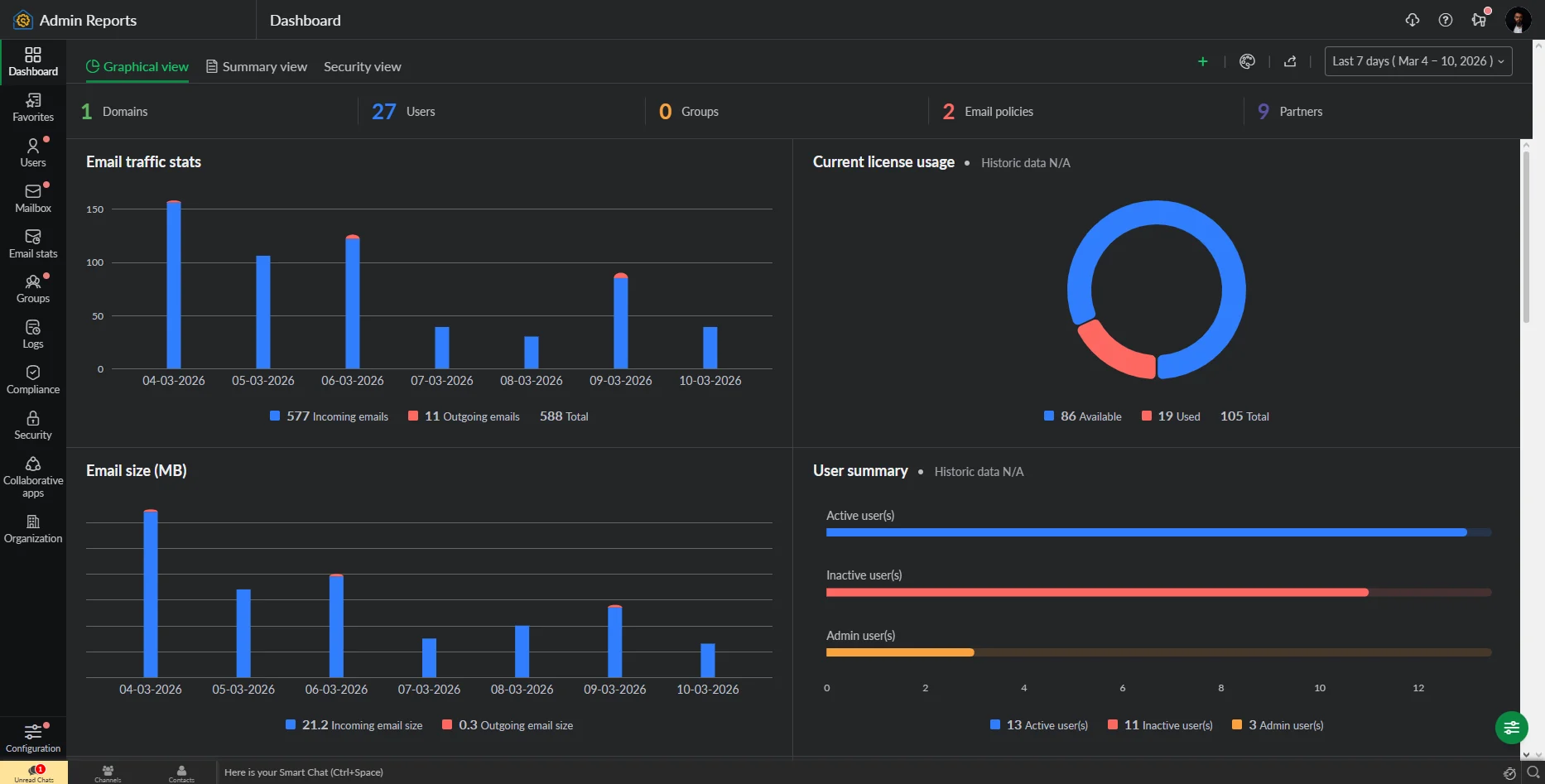
The graphical view turns your zoho mail email analytics into easy charts. You can see your inbound and outbound trends in just one glance. This visual part of the zoho mail admin dashboard is perfect for quick status checks. It helps you explain complex data to your management team without confusion. Charts make it very simple to identify sudden spikes in your email traffic.
Summary View Dashboard
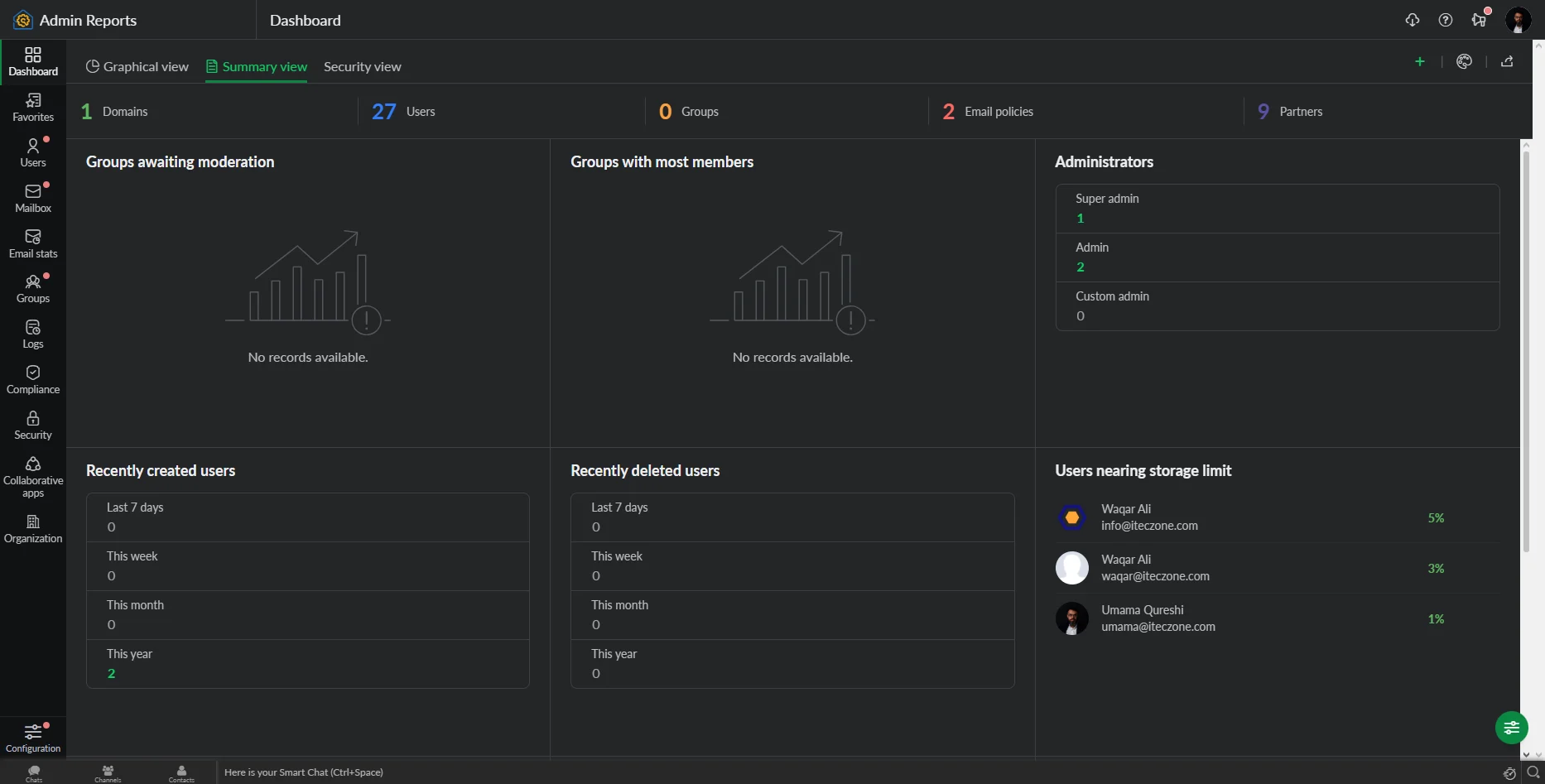
The summary view provides a fast text-based record of your organization email reports. It shows the total number of active users and their storage levels. This is the most popular part of the zoho mail admin dashboard for daily reviews. You can quickly see if any account is reaching its storage limit. It acts as a concise health report for your entire mail system.
Security View Dashboard
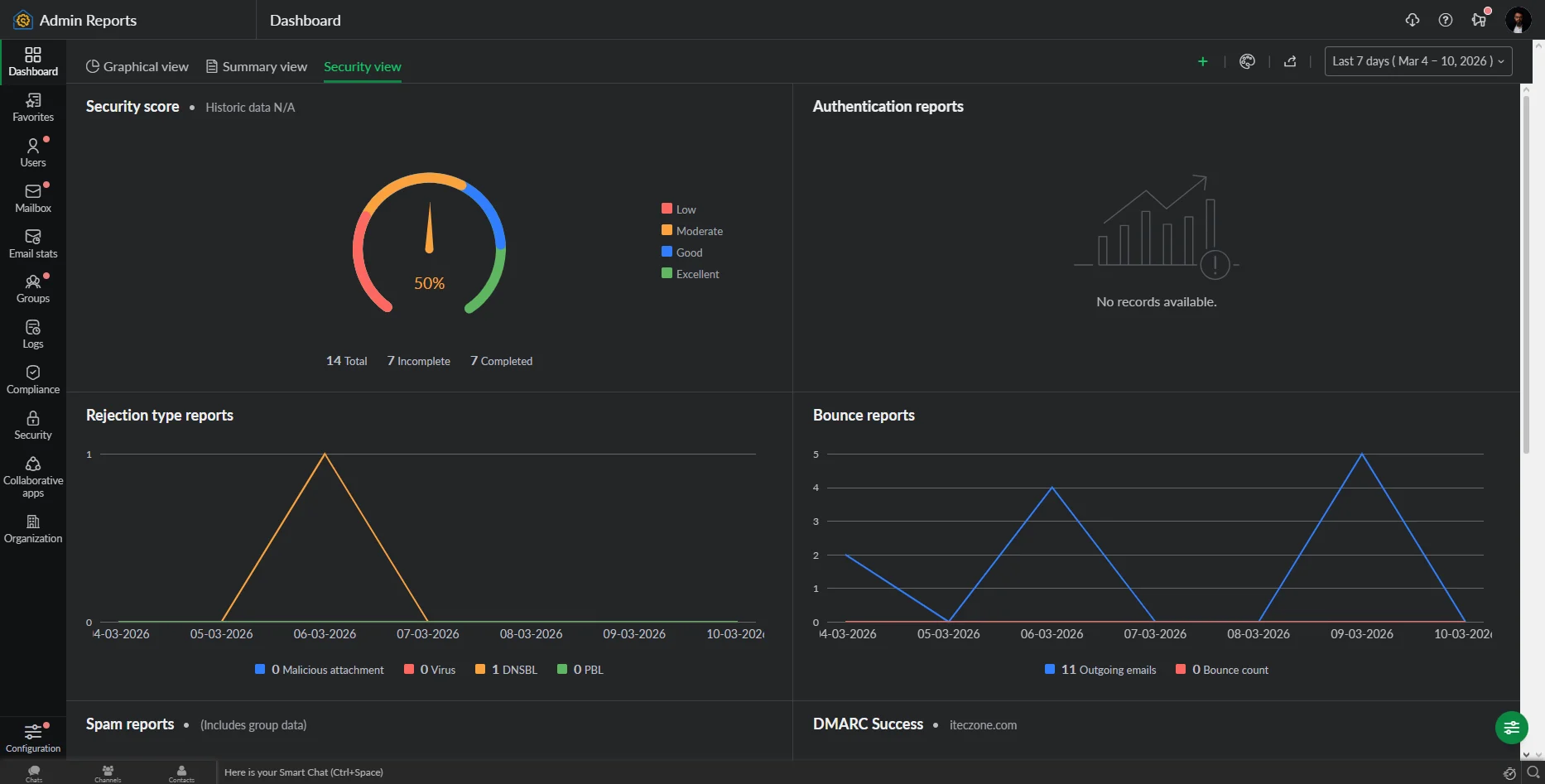
Your zoho mail security reports are the most critical part of the interface. This view highlights failed logins and suspicious account activity immediately. It is a core feature of the zoho mail reporting dashboard for safety. Protecting your private business data is much easier with these real-time alerts. You can block threats before they reach your employee inboxes.
Custom Dashboard Configuration
You can tailor your zoho mail reporting dashboard to show only what you need. Filter your zoho mail email reports by department or specific time frames. This flexibility makes the zoho mail admin dashboard a very powerful management tool. You can save your favorite views for even faster access in the future. Customization ensures that you only see the data that matters most.
Types of Admin Reports in Zoho Mail
User Account Reports
These reports track the status of every individual user in your system. You can see when an account was created or last accessed. It is a vital part of your organization email reports for staff management. Keeping track of user accounts prevents the waste of expensive licenses. You can easily spot inactive profiles that need to be closed.
Mailbox Reports
Reviewing mailbox usage reports zoho helps you manage your total storage costs. These mailbox usage reports zoho show which folders are taking up the most space. You can use mailbox usage reports zoho to plan for future upgrades. It ensures that no user loses an important email due to a full inbox. Regular mailbox usage reports zoho keep your system running at peak speed.
Email Statistics Reports
Detailed zoho mail email reports provide numbers on sent and received messages. These zoho mail email reports help you measure the productivity of your support teams. You can use zoho mail email reports to balance the workload across your staff. Understanding these zoho mail email reports leads to much better resource allocation. Statistics turn raw activity into useful business intelligence.
Advanced Reporting Categories
Group Reports
Groups allow you to see how different teams communicate internally and externally. These organization email reports are essential for tracking departmental collaboration. You can see which groups receive the most incoming customer inquiries. This helps you identify which areas of your business need more support staff. Group data provides a high-level view of your company structure.
DMARC Reports
DMARC data is a key part of your zoho mail security reports suite. It ensures that your emails are not being forged by outside hackers. These zoho mail security reports protect your brand reputation with other mail servers. You can see exactly which servers are sending mail on your behalf. Monitoring DMARC prevents your professional emails from ending up in spam folders.
Audit Logs Reports
Checking zoho mail audit logs is vital for tracking administrative changes. These zoho mail audit logs show who changed a password or a policy. You should review zoho mail audit logs every week for internal compliance. It provides a transparent history of every high-level action taken. Accurate zoho mail audit logs are a requirement for many modern industries.
Organization Reports
A full set of organization email reports covers your entire business domain. You can see the total traffic flow across every single department. These organization email reports help you forecast your annual technology budget. They provide the big picture that every business owner needs to see. Using organization email reports leads to much smarter long-term decisions.
Security Reports
Your zoho mail security reports help you find weak points in your network. They alert you to potential password leaks or unauthorized access attempts. Regular review of zoho mail security reports is the best defense against cybercrime. It keeps your sensitive client information safe from prying eyes. Safety is the most important benefit of a professional mail system.
Sharing and Exporting Zoho Mail Reports
Exporting Reports for Analysis
You can export zoho mail email analytics as CSV or PDF files. This allows you to perform deeper research in your favorite spreadsheet tools. Exporting email traffic reports zoho mail is very fast and simple for admins. It is the best way to archive your data for long-term storage. You can keep a physical record of your company’s digital history.
Sharing Reports with Teams
Sharing email activity reports zoho with your managers improves transparency. You can send email activity reports zoho to specific departments for review. This keeps everyone informed about their own communication performance and goals. Shared email activity reports zoho encourage a culture of accountability in the office. It is a great way to improve team efficiency.
Scheduling Automated Reports
You can schedule email traffic reports zoho mail to arrive in your inbox. This saves you from checking the zoho mail reporting dashboard every single day. Automated email traffic reports zoho mail ensure you never miss a critical update. You can set the frequency to daily, weekly, or monthly intervals. Automation is the secret to efficient and modern email administration.
Benefits of Using Zoho Mail Admin Reports
Better Email Usage Visibility
Visibility into email activity reports zoho helps you understand your business habits. You can see how long it takes for teams to reply to messages. This part of email activity reports zoho is vital for customer service. High visibility leads to faster response times and happier clients. It removes the mystery from your company’s daily communication flow.
Improved Security Monitoring
Using email traffic reports zoho mail helps you spot sudden unusual activity. This proactive monitoring is a major benefit of the Zoho ecosystem. You can react to threats before they cause any real damage. Security monitoring builds a strong wall around your professional data. It is a basic requirement for any successful modern brand.
Data-Driven Email Administration
Decisions should be based on facts found in your email traffic reports zoho mail. Data-driven management reduces guesswork and prevents expensive technical errors. You can prove your successes with actual numbers and detailed charts. This approach makes your administration much more professional and reliable. Turn your email data into a powerful tool for growth.
Conclusion
A well-monitored email system is the backbone of any professional business today. Zoho Mail provides the tools you need to stay safe and organized. By using these reports, you can protect your data and improve your team. Start reviewing your dashboard today to build a better digital future. Consistent monitoring leads to a much more productive and secure office.
Importance of Zoho for Your Business
Zoho is a vital partner for any growing business in the digital age. It offers a complete suite of tools to manage your entire operation seamlessly. However, setting up these complex systems requires professional knowledge and deep technical skill. With iTecZone as a certified Zoho partner and a team of experienced developers, you can access top-tier services for all Zoho applications. This is why iTecZone is the perfect choice as your Zoho Consultant Partner. We ensure your system is perfectly customized to meet your specific goals.
FAQ’s
Q1. What are Zoho Mail Admin Reports?
They are detailed data summaries that help administrators monitor email traffic, security, and user activity.
Q2. What data can be monitored using Zoho Mail Admin Reports?
You can track sent and received emails, storage levels, spam trends, and administrative change logs.
Q3. Does Zoho Mail provide security reports?
Yes, it offers specific reports on failed logins, spam patterns, and suspicious activities within your domain.
Q4. Can Zoho Mail Admin Reports be exported?
Yes, administrators can export these reports in formats like CSV or PDF for external review and sharing.
Q5. Why are admin reports important in Zoho Mail?
They help maintain security, manage storage costs, and ensure all employees are using email professionally and effectively.