In today’s digital world, keeping your accounts safe is a full-time job. Most of us juggle dozens of logins across different platforms, and the thought of one of them getting hacked is enough to cause a massive headache. This is where Zoho OneAuth steps in. But a common question many business owners ask is: “Can it actually play nice with the other apps I use every day?”
The short answer is a big yes. Zoho OneAuth isn’t just restricted to the Zoho ecosystem; it’s designed to be a universal key for your digital life. Whether you are running a small startup or managing a large team, understanding how this tool connects with your existing software stack is a game changer.
Beyond Zoho: A Universal Authenticator
Source: Zoho
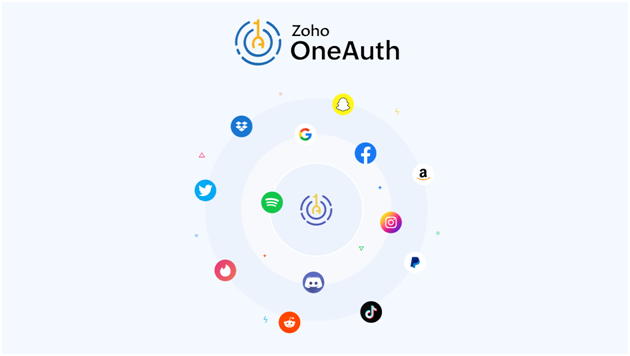
While Zoho OneAuth is built by Zoho, it functions as a comprehensive Multi-Factor Authentication (MFA) app. This means you can use it to secure almost any service that supports standard TOTP (Time-based One-Time Password) protocols. It’s a versatile tool that bridges the gap between different service providers.
Think about the big players you use for work or personal branding. Whether you are logging into Google to check your emails or manage your Drive, updating your company profile on Facebook, or sharing a quick industry update on Twitter, Zoho OneAuth can handle the security for all of them. You don’t need a different app for every service; you just need one reliable one.
Why Use Zoho OneAuth for Everything?
You might wonder why you should choose this over other basic authenticators. The benefit is the seamless experience and the added layers of protection that Zoho provides. Instead of having one app for Zoho, another for your Google Workspace, and a separate method for Facebook or Twitter, you can consolidate everything into a single, clean interface.
It offers advanced features like cloud backup, which is a lifesaver. If you happen to lose your phone or upgrade to a new device, you can recover your accounts easily. It also includes a “Restricted Mode” and biometric locks (like Fingerprint or Face ID) for extra security. Plus, if you are already using Zoho for your business CRM or mail, having Zoho OneAuth as your central security hub just makes your daily workflow much smoother.
How Integration Actually Works
The process of connecting your accounts is straightforward and doesn’t require a degree in IT. Most major cloud service providers like Google and popular social platforms like Twitter or Facebook have a “Security” or “Two-Factor Authentication” section in their settings. When you choose the “Authenticator App” option, these sites will provide a QR code on your screen.
Scanning that code with Zoho OneAuth instantly links the account. From that moment on, whenever you log in to Google to check your documents or check your notifications on Facebook, you simply open your Zoho app, grab the six-digit code, and you’re in.
For those who use Zoho services specifically, the integration is even deeper. You can use “Push Notifications” or “QR Sync” to log in without even typing a code. This level of convenience, combined with the ability to still protect external accounts like Twitter, makes it a top-tier choice for security-conscious users.
Breaking the “App Fatigue”
We all suffer from having too many apps on our phones. By choosing Zoho OneAuth as your primary MFA tool, you’re effectively decluttering your digital workspace. You get the robust security of the Zoho infrastructure while maintaining access to your global accounts on Google, Facebook, and Twitter. It’s about making security feel like a natural part of your day rather than a chore.
Frequently Asked Questions (FAQs)
1. Is Zoho OneAuth free to use?
Yes, it is completely free for both personal and business use. You can secure your Zoho account along with your accounts on Google, Facebook, and Twitter without any subscription fees.
2. What happens if I lose my phone?
As long as you have enabled the “Cloud Backup” feature in your settings, you can easily restore all your linked accounts to a new device using your master passphrase.
3. Can I use it on more than one device?
Absolutely. You can install it on your smartphone, tablet, and even your smartwatch. It syncs across your devices so you can get your codes for Twitter or Google wherever is most convenient.
4. Is it better than Google Authenticator?
While both do a great job, many users prefer this option because it offers encrypted cloud backups and a more organized interface with folders and brand logos for sites like Facebook.
Final Thoughts on Security
Security shouldn’t be a hassle. By using Zoho OneAuth to protect your accounts on Google, Twitter, and Facebook, you are building a solid wall around your digital identity that is very hard for hackers to bridge. It’s one of those small changes that gives you massive peace of mind in an era where data breaches are unfortunately common.